Our second hand-tracked mixed-reality experiment. Place Rainbow wherever you want first; she then notices an offered hand and leans forward to give it her signature face bump. The 3D cat is an early sculptural prototype; her real-life markings guide the design.
Say hello in passthrough
On your Quest 3, open this page in Quest Browser, put down the controllers, and press the button below.
First place Rainbow by looking toward the spot you want. Pinch your right hand to set her down. Pinch your left hand to cycle through distances, or choose a starting distance and height below. Once placed, approach and slowly offer an open hand.
In VR, hold a left-hand pinch for about 2 seconds to reopen placement mode without leaving passthrough. Stay aware of real furniture; the virtual cushion does not detect actual surfaces.
Checking headset support…
Quest 3 test — version 002
- Confirm color passthrough shows your real room.
- Confirm you can see Rainbow in both eyes and move her preview by looking around.
- Right pinch to place her, then offer an open hand near her nose: she leans toward you.
- Gently move closer: does she bump and purr?
- Try petting her back and the base of her tail.
- Tell us what feels right or wrong: cat size, height, orientation, and reach distance.
This prototype has no surface detection or treat-dropping or belly-rub system yet. We are testing fundamental contact and response first.
The real Rainbow
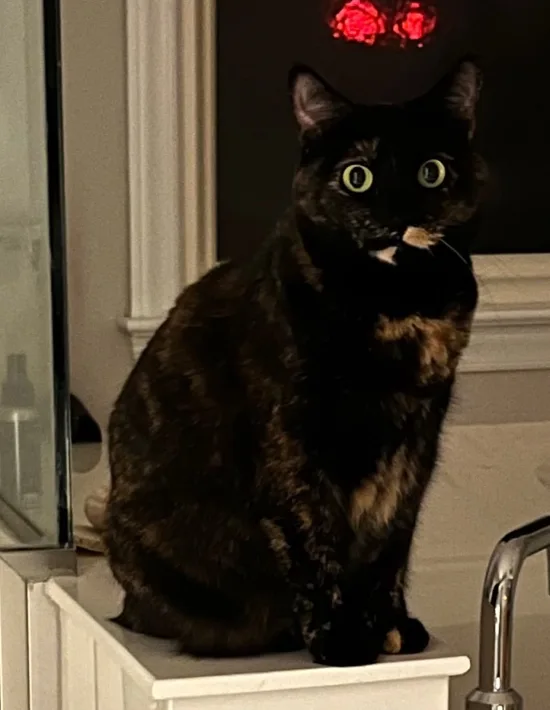
Our model is based on Rainbow's dark tortoiseshell coat, green eyes and striking asymmetrical mouth markings. A responsive, lifelike version will take several experiments.
This is a separate project from Dinoscores and the Hand Tracking Lab. No player progress is changed.